How to Hide WhatsApp Messages on iPhone by Ar
Do you want to keep your WhatsApp conversations and med...








Wondering what apps have access to your iPhone or iPad microphone? Want to control and manage which apps can use the microphone on your device? Apple has added an additional security feature to iOS that allows users to control exactly which apps can have access to the microphone. Yes, the microphone that you speak into on the device, either at the bottom of an iPhone / iPod or at the top of an iPad.
This offers a way for you to improve your privacy and security, and to see what apps are using the microphone on your iPhone or iPad. Using this app list, you can then control and toggle what apps are able to use your microphone as well, so if you decide you no longer want to allow a particular app to access the mic, you can turn it off easily.
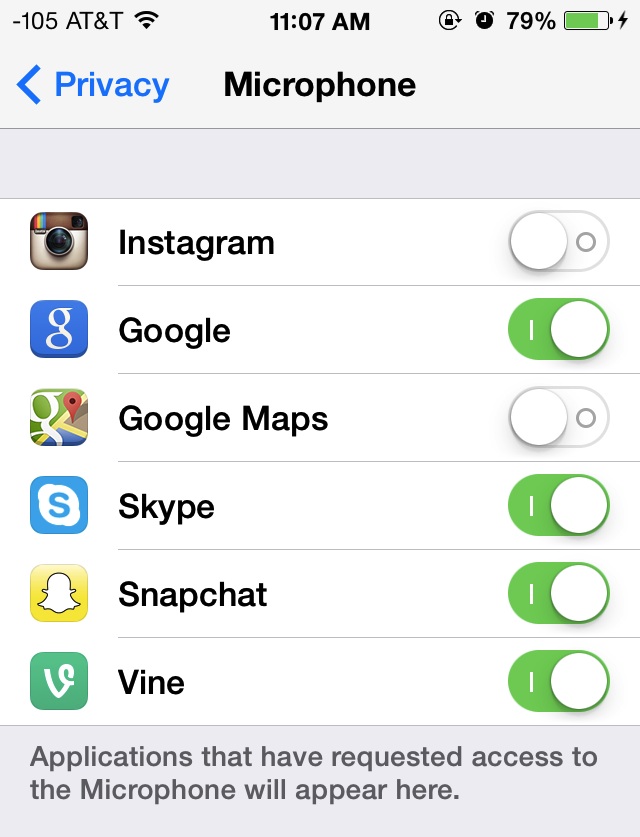
The microphone access controls are tucked away within the Privacy settings of iOS, and the same controls also include a complete list of apps with audio input access:
How to Control What Apps have Microphone Access on iPhone and iPad
You’ll find the complete list of apps that have requested access, and whether or not they have microphone access is determined by the ON/OFF toggle switch. Flipping any of those switches to the OFF position prevents that app from accessing the microphone, but in most cases, the app itself will continue to function.
It’s worthwhile to review this list from time to time for your own privacy purposes, but it’s particularly important with iPhones, iPads, and iPod touch devices that are given to children and/or deployed in environments where per-app control of microphone access is a valid security precaution. Users who wish to lock down microphone usage further can use the Restrictions and Parental Controls functions to set a preference, and then prevent any adjustments from being made by other parties, or even prevent all apps from gaining mic access, which effectively disables the microphone on the iPhone/iPad completely (with the exception of the phone app for iPhone users, of course).